
P999-Game Deposit Process: Step-by-Step Guide
If deposits are available on the P999 Game platform, users generally add funds by logging into their account, selecting the option, choosing an available payment method, entering the amount, completing any required verification, and confirming the transaction.
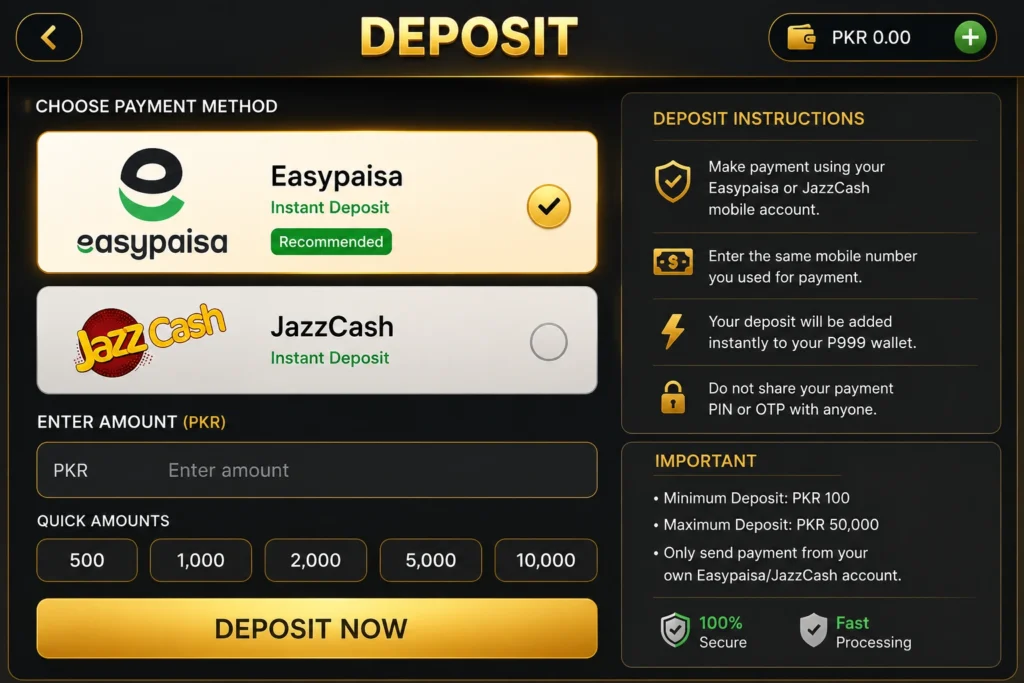
Because payment methods, minimum deposit amounts, fees, limits, and verification requirements can change, always follow the current instructions displayed by the legitimate platform.
Step 1: Log In to Your Account
Open the legitimate P999-Game website or application and sign in using your existing account credentials.
Enter your registered login information carefully. Before entering your password, make sure you are using the correct platform and not an unofficial page.
Never provide your password or OTP to another person claiming to complete the deposit for you.
Step 2: Open the Deposit or Wallet Section
After logging in, open your account dashboard, wallet, or balance section.
Look for an option such as:
- Deposit
- Add Funds
- Recharge
- Wallet
- Top Up
The exact wording may differ depending on the current website or application version.
Select the appropriate option to begin the process.
Step 3: Review the Available Deposit Methods
The platform may display several payment methods.
Available options can vary according to your location, account, platform version, and current payment arrangements.
Before choosing a method, check:
- Whether it is currently available.
- Minimum and maximum deposit limits.
- Any applicable fees.
- Expected processing time.
- Whether the payment account must be registered in your name.
Only use payment methods that you understand and are authorized to use.
Step 4: Select Your Preferred Payment Method
Choose the payment method you want to use from the options displayed on the legitimate platform.
Follow the instructions provided on the deposit page rather than relying on payment details copied from social media posts, chat groups, or unknown websites.
If the platform displays recipient or payment information, carefully verify it before proceeding.
Step 5: Enter the Deposit Amount
Enter the amount you want to.
Before continuing, make sure the amount meets the platform’s current minimum deposit requirement and does not exceed any applicable maximum limit.
Review the amount carefully because entering an incorrect figure can result in an unintended transaction.
Only deposit money that you can afford to lose if the service involves real-money gaming or wagering.
Step 6: Review the Payment Details
Before making the payment, carefully review all information displayed by the platform.
Check:
- Deposit amount
- Selected payment method
- Recipient information, where applicable
- Transaction or reference information
- Applicable fees
- Final amount
If anything looks unusual or different from the platform’s normal instructions, stop and verify the information before sending funds.
Step 7: Complete the Payment
Follow the instructions provided by the selected payment method to complete the transaction.
Depending on the payment service, you may need to authorize the payment through your bank, wallet, card provider, or another supported service.
Never share your banking PIN, card PIN, password, or security credentials with another person.
Step 8: Complete OTP or Security Verification
Some payment providers may require additional authentication, such as an OTP or other verification step.
Only enter verification codes into the legitimate payment or platform interface where they are specifically required.
Never send an OTP to an agent, administrator, customer-service representative, or another person through messaging applications.
An OTP should be treated as confidential.
Step 9: Confirm the Transaction
After completing the payment, wait for the payment provider or platform to confirm the transaction.
Do not immediately repeat the deposit if the balance does not update.
A payment can sometimes take additional time to process depending on the payment method or technical conditions.
Step 10: Check Your Account Balance
Return to your P999-Game account and check the wallet or balance section.
If the deposit has been successfully credited, the updated balance should be reflected according to the platform’s current system.
You can also check the transaction history if the platform provides one.
Step 11: Check the Deposit Status
If your funds have not appeared, open the account’s transaction history or payment section and look for the relevant transaction.
A transaction may have a status such as:
- Pending
- Processing
- Completed
- Failed
- Rejected
The exact meaning of each status depends on the platform.
If the transaction is marked pending, allow the stated processing period to pass before taking further action.
Step 12: Keep Your Transaction Reference
If the platform or payment provider provides a transaction ID, receipt, or reference number, keep it for your records.
This information can be useful if you need to contact legitimate customer support about a delayed or unsuccessful deposit.
Do not publicly share screenshots containing sensitive payment or account information.
Step 13: What to Do If the Deposit Is Not Credited
If money has been deducted from your payment account but the P999-Game balance has not been updated, do not immediately make another deposit.
First:
- Check your payment account or bank statement.
- Check the platform’s transaction history.
- Confirm whether the transaction is pending or completed.
- Save the transaction reference.
- Contact the platform through its legitimate support channel if necessary.
Provide only the information genuinely required to investigate the transaction.
Step 14: Avoid Unofficial Deposit Requests
Be extremely careful if someone contacts you privately and asks you to send money to a personal account, wallet, or payment address in exchange for adding funds to your gaming account.
Do not assume that someone is an official representative simply because they use the P999 name, logo, or profile picture.
Verify payment instructions through the legitimate platform before transferring money.
Step 15: Review Your Deposit History
After the transaction is completed, review your account’s history where available.
Keeping track of deposits can help you understand your spending and identify transactions that you do not recognize.
If the service involves real-money gaming, maintaining a clear personal spending limit is especially important.
Important Safety Reminder
Only make through payment methods and instructions provided by the legitimate P999-Game platform. Never provide your password, OTP, banking PIN, card PIN, or other confidential credentials to another person.
P99-9.com is an independent informational website and does not process deposits, receive users’ money, access payment accounts, or complete transactions on behalf of users.
Information about P999 is published on this website only in response to users’ demand for information and search interest. Deposit methods, limits, fees, and processing requirements may change, so always verify the current information directly through the applicable platform before making a financial transaction.